


Cubtale: Pregnancy & Baby
4.3223.00 Reviews
App Specs
- Version
- 4.8.3
- Updated On
- License
- Free
- Downloads
- 50,000+
- Developer
- Cubtale
- Categories
- Parenting
- Platform
- Android
Screenshots
 Analysis by AppCompare
In my experience, baby tracking is most useful when it removes small uncertainties rather than adding another chore. I’d consider Cubtale Baby Tracker if you want one place to keep an eye on feeds, sleep, diaper changes and growth, especially when more than one person cares for your baby. It is a free parenting app from Cubtale, and its 4.7 average from around 1.5 thousand ratings suggests many families find the approach worthwhile. I would still treat any tracker as a practical record, not a substitute for your own judgement or a health professional’s advice.
Where setup and daily use can snag
The tricky part of a baby log is rarely understanding what to record; it is remembering to record it while holding a baby, preparing a bottle or trying to get some rest. Even a simple interface can feel like friction if every entry takes too long. I’d start with the events your household actually needs to remember, rather than trying to document every detail from day one. A short, consistent record is more useful than an ambitious log that no one keeps up.
Before relying on shared tracking, agree with other caregivers on who will log which events and when. If two people both record the same feed, the history can become less useful; if each assumes the other has done it, a gap appears. A quick handoff habit—checking the latest entry before taking over—can prevent both problems without turning care into a checklist.
Simple checks before you depend on the log
When an entry seems missing or a shared update is not where you expect it, I’d first check the basics: whether the right baby profile is open, whether the event was actually saved, and whether the other caregiver is looking at the same shared setup. Closing and reopening the app can also help when a screen appears stale. These are sensible first checks for any shared log; they are not a reason to assume the record has synced until you can see the update.
For the first few days, compare the log with what your household is doing in real time. That gives you a chance to spot an accidental duplicate or an overlooked entry before you begin using the history to discuss patterns. If you use notes or extra tracking fields, keep their meaning clear between caregivers. A brief note such as what you want the entry to clarify is more useful than a shorthand only one person understands.
Recovering a routine after a missed entry
There will be times when no one remembers exactly when something happened. I would not guess at a precise time just to make the day look complete. If you do add a retrospective note, make clear to yourself that it is an estimate; otherwise, leave the gap and continue logging from the next event. Consistent, honest records are easier to interpret than a tidy timeline built from uncertain details.
A realistic example is a parent returning home while another caregiver has been on duty. Rather than asking for a full verbal recap, the returning parent can check the recent feeding, sleep and diaper entries, then ask about anything that still matters. That works best when both people record the same essentials and treat the log as a handoff aid, not as proof that every moment has been captured.
Worth Reading Before You Choose

EA SPORTS FC Mobile 26 Is a Bigger Football Game, but It Takes Time

Flipboard Shows What News Apps Must Do Beyond the Feed

Switching to Android Auto Means Rethinking Your Driving Routine

Google Calendar Makes a Crowded Week Easier to Manage

Ludo King Makes the Most of the Minutes Between Plans

Baby Panda World Brings Quick Play to Modern Phones, but Its Game Library Feels Busy
When a tracking app is not the answer
A missing update can come from ordinary workflow issues, a device or connection problem, or a caregiver forgetting to save an entry; it does not automatically mean the app itself is at fault. If the same issue continues after basic checks, use the app’s available support route rather than repeatedly entering the same event and creating a confusing history. And if you need medical guidance, a tracker can help you bring observations to a clinician, but it cannot assess your baby or tell you what treatment to choose.
This kind of app is not ideal for every family. If you prefer not to log routine care, find that notifications make you more anxious, or need a tool that serves a clinical purpose, a paper note or advice from a qualified professional may suit you better. I’d also avoid treating patterns in a tracker as predictions: babies’ routines change, and a chart is only as reliable as the entries behind it.
Who benefits most from a shared record
I can see the strongest case for Cubtale in households where care shifts between parents, relatives or another regular caregiver. A shared record can reduce repeated questions and make it easier to notice what happened during a busy stretch. It may also help a parent who wants a steadier overview without keeping separate notes for feeding, sleep and diaper changes.
For a family with one caregiver and a routine already easy to remember, the extra logging may not be worth it. The same goes for anyone who only wants a medical-grade monitoring tool: a general baby tracker is not a replacement for one. The useful question is whether a shared, written history solves a real daily problem in your home.
How it fits beside familiar alternatives
Compared with a paper notebook, an app can make entries easier to review and share, but a notebook has no learning curve and does not ask you to interact with a screen during a demanding moment. Compared with a general notes app, a dedicated baby tracker keeps the subject matter together rather than mixing care details with shopping lists and messages. The trade-off is that you need to maintain a digital habit and make sure the relevant caregivers can use the same record.
Cubtale is aimed at practical routine tracking, not at replacing every parenting resource. Its store description focuses on feeds, sleep, diaper changes and growth, so I’d choose it for organizing those everyday observations. If your priority is simply remembering one appointment or writing a long journal entry, a calendar or notes app may be more direct. If you mainly need professional advice, speak with a clinician rather than expecting an app’s record to interpret symptoms.
Seamlessly Track Your Baby’s Day
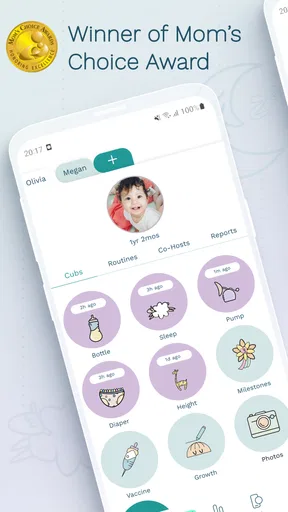
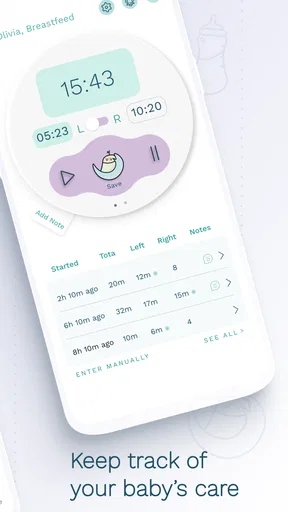
One of the first things I noticed about Cubtale Baby Tracker is how intuitive it is. The interface is clean and straightforward, which is a blessing when you're navigating through the fog of sleep deprivation. You can easily log activities like feeding, sleeping, and diaper changes with just a few taps. It’s almost like having a digital diary for your baby’s routine.
The app also allows you to customize the tracking fields. If you’re someone who likes to keep tabs on every little detail, you can add notes or even track things like tummy time and medications. This flexibility means you can tailor the app experience to suit your family’s needs.
Real-Time Syncing and Notifications
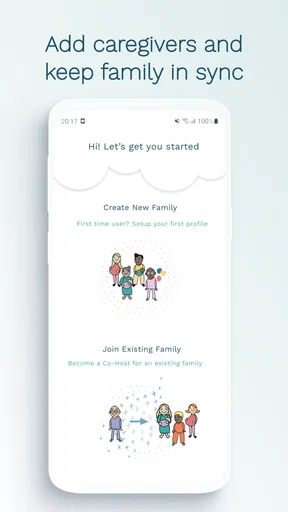
One of the standout features for me was the real-time syncing. If both parents or caregivers have the app, you can share updates instantly. This is a game-changer for coordinating care without needing constant verbal communication. Plus, the app sends notifications, so if you’re in another room, you’ll never miss a beat on when the last feeding or nap occurred.
Imagine being able to step out for a moment and still be in the loop about your baby’s schedule. That’s peace of mind in a world where everything can feel a bit chaotic.
Insights and Analytics
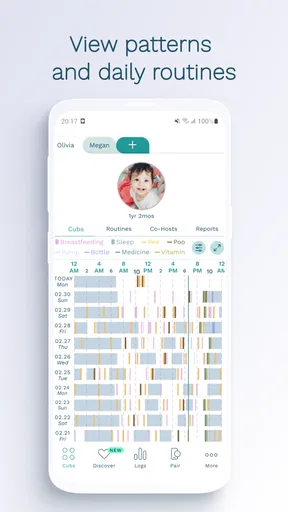
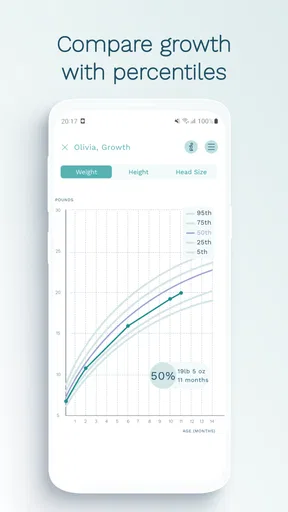
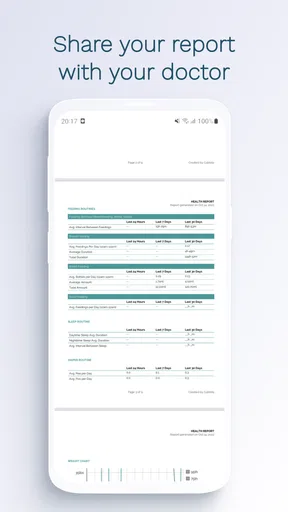
Beyond just tracking, Cubtale offers insights into your baby’s patterns. Over time, you can see trends in sleep, feeding, and diaper changes. This data can be incredibly helpful when discussing your child’s development with a pediatrician or trying to establish a more consistent routine.
The app’s charts and summaries are easy to understand, even if you’re not a data whiz. It’s like having a personal assistant that helps you anticipate your baby’s needs before they even realize it themselves.
User Experience and Design
I have to give a shoutout to the app’s design. The developers have clearly put a lot of thought into making it user-friendly. The colors are soothing, the layout is intuitive, and it doesn’t overwhelm you with too many options at once. It feels like a breath of fresh air among the clutter of many other parenting apps.
Even if you’re not tech-savvy, you’ll find yourself navigating the app with ease. It’s like they’ve created this space that respects the busy, beautiful chaos of parenting.
Community and Support
Another delightful surprise was the community aspect of Cubtale. The app connects you with other parents, allowing you to share tips, ask questions, and even commiserate on those tougher days. It’s a reminder that you’re not alone in this journey, and sometimes, that’s exactly what you need to hear.
If you ever run into issues or have questions, their support team is responsive and helpful. It’s clear that they’re committed to providing a seamless experience for users.
What to expect from access and ongoing use
Cubtale is free to download, with in-app purchases ranging from $2.99 to $139.99 per item. I’d check which options are relevant to your family before paying for anything, and begin with the free experience to see whether the logging routine sticks. The app is rated for Everyone, runs on Android 6.0 or later, and its current version is 3.15.0. It has passed 10 thousand installs, so it is not an obscure experiment, though popularity alone cannot tell you whether its workflow will suit your household.
One useful way to test the fit is to use it for a narrow purpose first: record the events that tend to get lost during caregiver handoffs. After a few days, ask whether checking the app actually saves time or simply shifts the work from memory to data entry. If it helps answer practical questions quickly, expand the routine gradually; if not, there is little value in tracking more fields merely because they are available.
For families worried about whether a missed or unusual entry means something is wrong, I’d keep the distinction clear: the record can organize observations, but it cannot explain them. Use it to communicate what you have noticed, including uncertainty, and seek appropriate professional advice when a health concern arises. That boundary makes the app more useful, not less, because it keeps its role realistic.
Final Thoughts
All in all, Cubtale Baby Tracker is a fantastic tool for any parent looking to bring a little more order to their baby’s schedule. It’s not just a tracker; it’s a partner in your parenting journey. With its user-friendly design, real-time syncing, and insightful analytics, it’s a must-have for anyone with a little one at home.
So, if you’re ready to streamline your baby’s routine and gain some peace of mind, give Cubtale a spin. It might just become your parenting MVP.
Pros
- User-friendly interface for easy navigation.
- Comprehensive tracking of baby activities.
- Customizable reminders for important tasks.
- Real-time syncing across multiple devices.
- Supports multiple languages for diverse users.
Cons
- Limited offline functionality without internet.
- Free version has restricted features.
- Requires account creation for full access.
- Occasional sync issues between devices.
- Ads in free version can be intrusive.
FAQs for Cubtale: Pregnancy & Baby
What features does Cubtale Baby Tracker offer?
Cubtale Baby Tracker provides a range of features designed to help parents monitor their baby's activities. It includes tracking for feeding, diaper changes, sleep patterns, and growth milestones. Additionally, the app offers reminders and personalized insights to help parents better understand and manage their baby’s daily routine.
Is Cubtale Baby Tracker easy to use for new parents?
Yes, Cubtale Baby Tracker is designed with a user-friendly interface that is intuitive for new parents. The app simplifies the process of logging activities with easy-to-navigate menus and clear instructions. Its clean design ensures that even those who are not tech-savvy can easily record and access essential information.
Can multiple caregivers access the same Cubtale account?
Absolutely. Cubtale Baby Tracker allows multiple caregivers to access and update the same account. This feature is especially useful for families with multiple caregivers, such as parents, grandparents, and babysitters, ensuring that everyone stays informed and coordinated on the baby’s needs and activities.
Does Cubtale Baby Tracker work offline?
Yes, Cubtale Baby Tracker can be used offline, allowing parents to log baby activities without an internet connection. Once the device reconnects to the internet, the app will automatically sync the data. This feature is particularly beneficial for parents on the go or in areas with limited connectivity.
Is there a cost associated with using Cubtale Baby Tracker?
Cubtale Baby Tracker offers a free version with essential features. However, it also provides a premium subscription that unlocks additional features such as advanced analytics, personalized insights, and ad-free usage. Users can choose the plan that best suits their needs and budget.


